
How PriorityEngine Works
Stop managing email. Start managing business signals.
Most businesses don't struggle because they receive too many emails. They struggle because the important ones are hidden among newsletters, notifications, spam, and low-priority conversations.
PriorityEngine was built to solve exactly that problem.
Instead of forcing you to search through hundreds of messages every day, PriorityEngine transforms your inbox into a structured Business Signal Operating System, helping you identify what deserves your attention first.
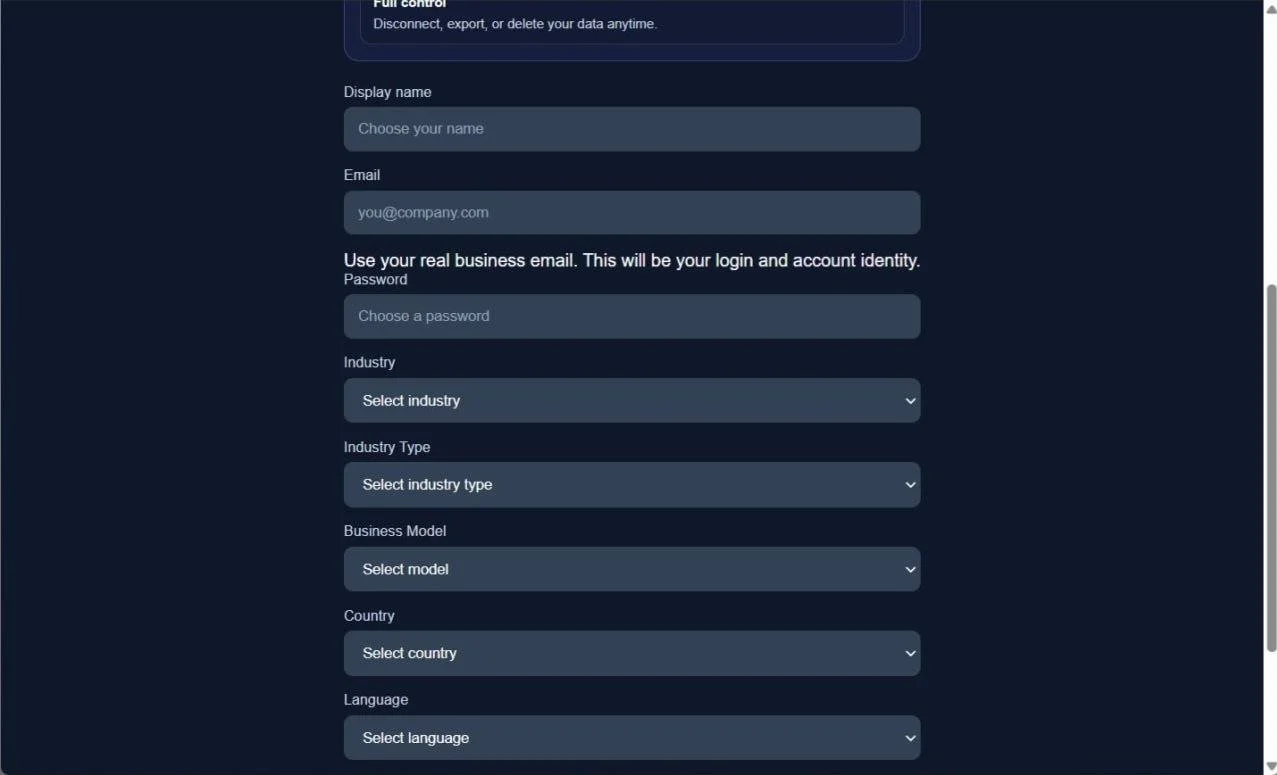
Step 1 – Create your account
Creating your workspace takes less than a minute.
Simply enter your business information, choose your industry, business model, language, and country. These settings help PriorityEngine adapt its organization and analysis to your business environment from the very beginning.
Whether you're a freelancer, consultant, agency, online store, startup, or small business, your workspace is tailored to the way you work.
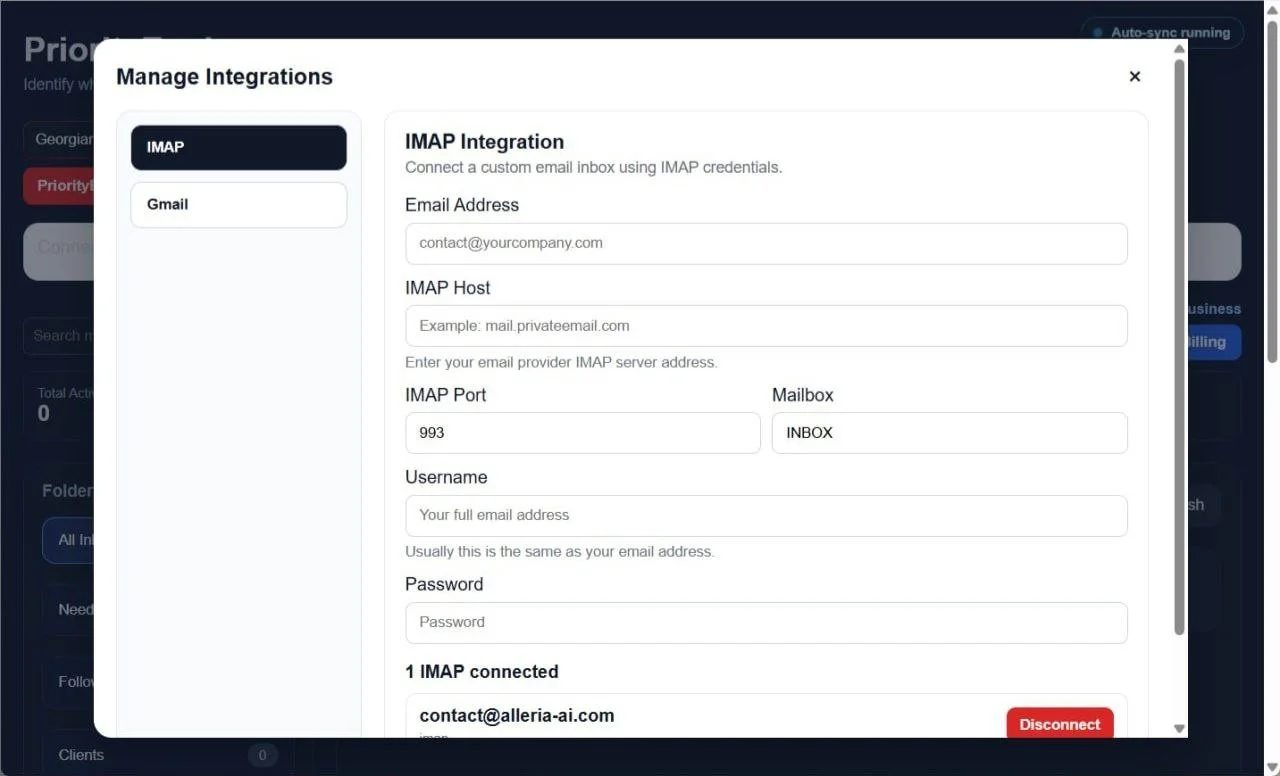
Step 2 – Connect your inbox
Connecting your inbox takes only a few moments.
PriorityEngine supports two secure connection methods:
Gmail using Google OAuth
Any email account that supports IMAP
Simply authorize your Gmail account or enter your IMAP server details to connect your business inbox. Once the connection is established, PriorityEngine imports your emails and begins organizing them automatically—no manual folders, filters, or email rules required.
Whether you manage a single inbox or multiple business email accounts, PriorityEngine brings them together into one workspace, helping you focus on the messages that matter most.
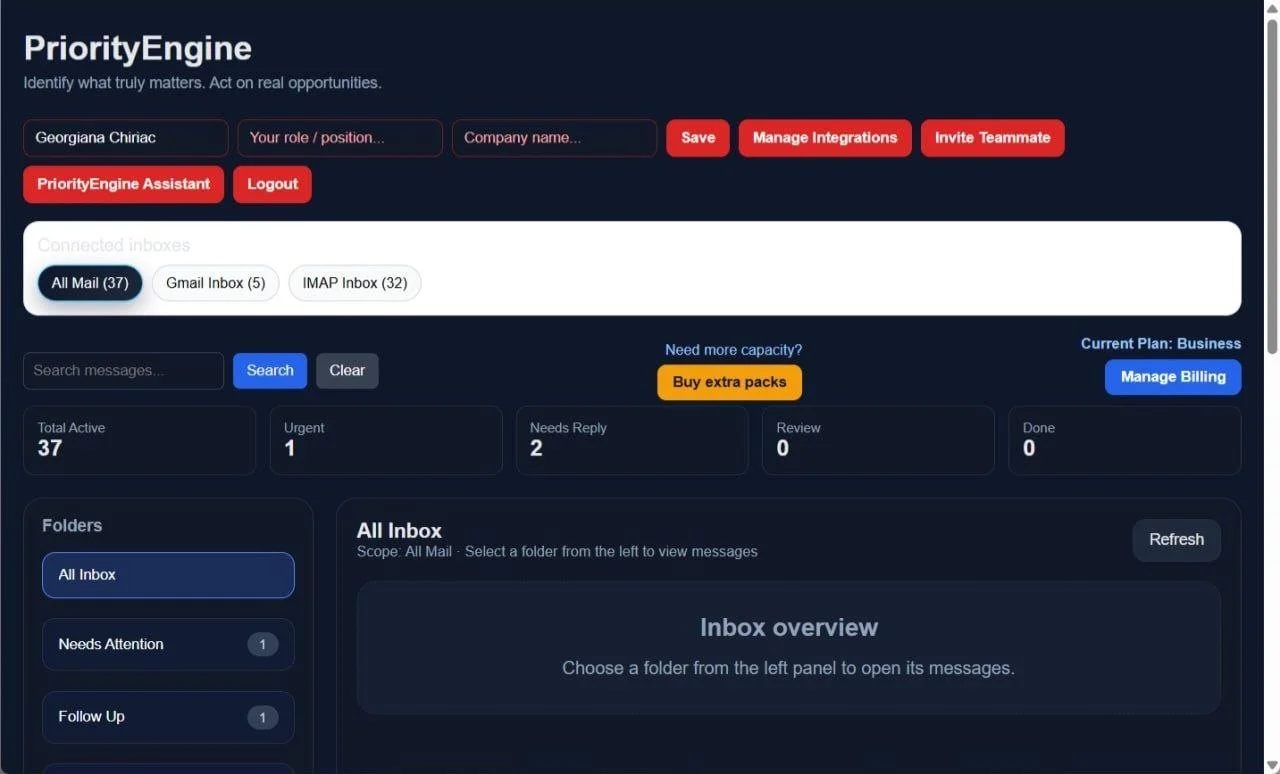
Step 3 – Your inbox is automatically organized
Once your inbox is connected, PriorityEngine imports your emails and analyzes each message to determine its business context and priority.
Instead of displaying every email in a single, overwhelming inbox, PriorityEngine automatically organizes messages into dedicated business folders such as Needs Attention, Clients, Opportunities, Financial, Documents, Schedule, Newsletter, and Noise.
This allows you to access the right emails instantly, without manually sorting messages or searching through hundreds of conversations. Every message remains available in one centralized workspace, so you can focus on the information that matters most to your business.
The original email remains unchanged in your connected mailbox. PriorityEngine creates an intelligent business workspace that helps you find and act on the right messages faster.
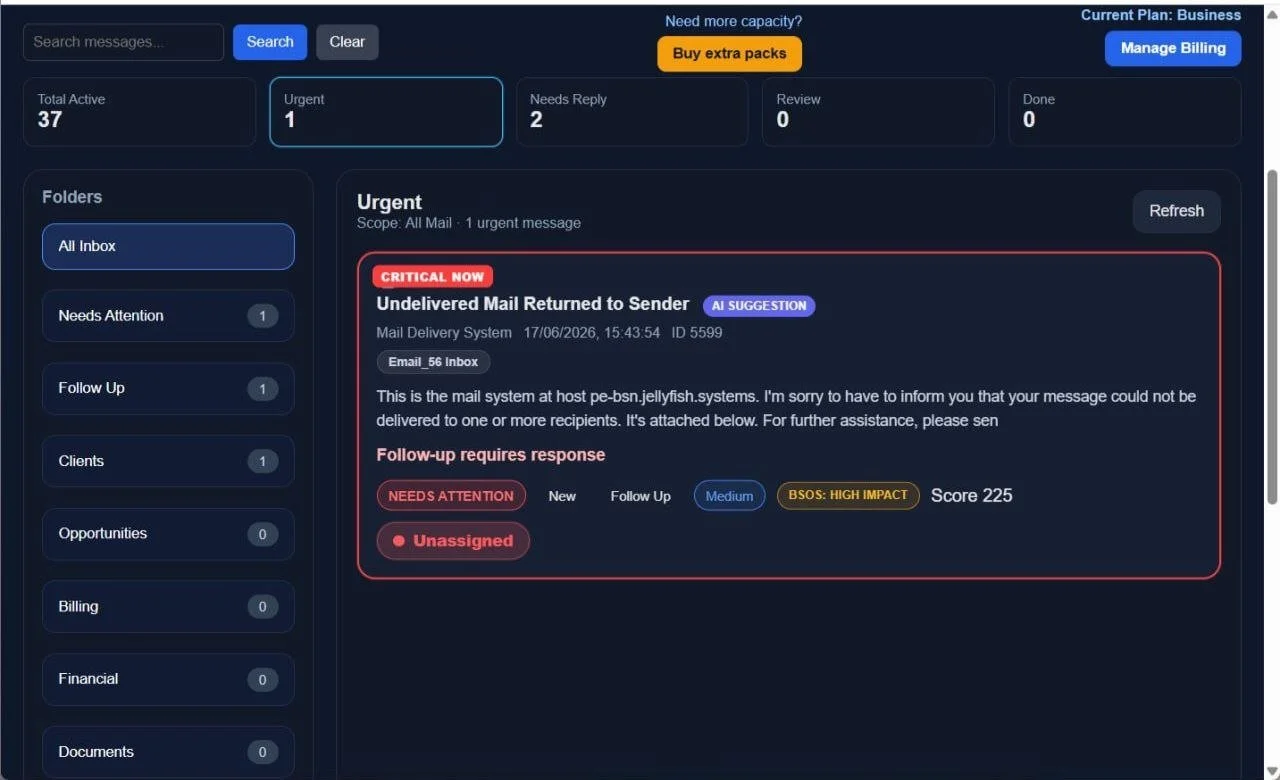
Step 5 – Authority Layer highlights what truly matters
Not every email deserves the same level of attention.
PriorityEngine uses its Authority Layer to identify and surface the business signals that require immediate action. Instead of treating every message equally, the system prioritizes emails based on their business importance, urgency, and potential impact.
Critical emails—such as client requests, business opportunities, financial communications, and follow-ups—are brought to the front of your workspace, allowing you to act on them immediately.
At the same time, lower-priority content such as Newsletters and Noise is automatically organized into separate folders, keeping distractions out of your primary workflow while remaining accessible whenever you need them.
This intelligent prioritization helps you spend less time searching through emails and more time responding to the conversations that move your business forward.
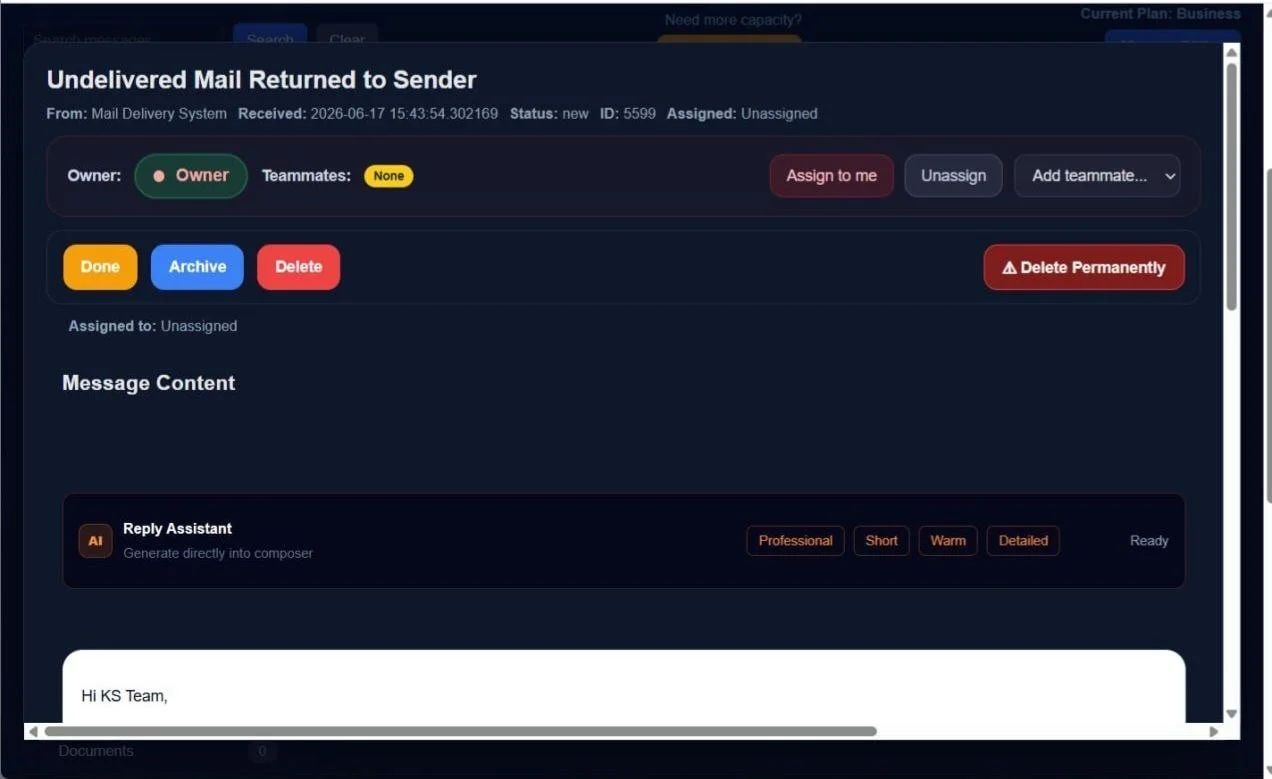
Step 6 – Work directly from your PriorityEngine workspace
Every imported email becomes an interactive workspace where you can manage the entire conversation without switching between applications.
From a single screen, you can:
Read the complete email content
View AI analysis and business context
Assign the message to yourself or a teammate
Add teammates to collaborate
Write internal notes
Set follow-up reminders
Reply directly from PriorityEngine
Archive, delete, or permanently remove messages when appropriate
Track the complete activity history for every conversation
Instead of constantly switching between your email client and other tools, PriorityEngine gives you everything you need to review, collaborate, and take action from one centralized workspace.
Step 7 – Permanent Delete (Business Owner)
Business Owners have access to Permanent Delete, a feature designed to keep both PriorityEngine and the original mailbox organized.
Unlike a standard delete or archive action, Permanent Delete removes the email from both:
the PriorityEngine workspace
the connected email provider (Gmail or IMAP)
This helps eliminate messages that no longer provide business value, reducing clutter across both environments.
For security and administrative control, this action is available only to the Business Owner. Team members can collaborate, reply, assign messages, add notes, and manage follow-ups, but they cannot permanently delete emails from the connected mailbox.
This permission model helps organizations maintain a clean inbox while protecting against accidental data loss.
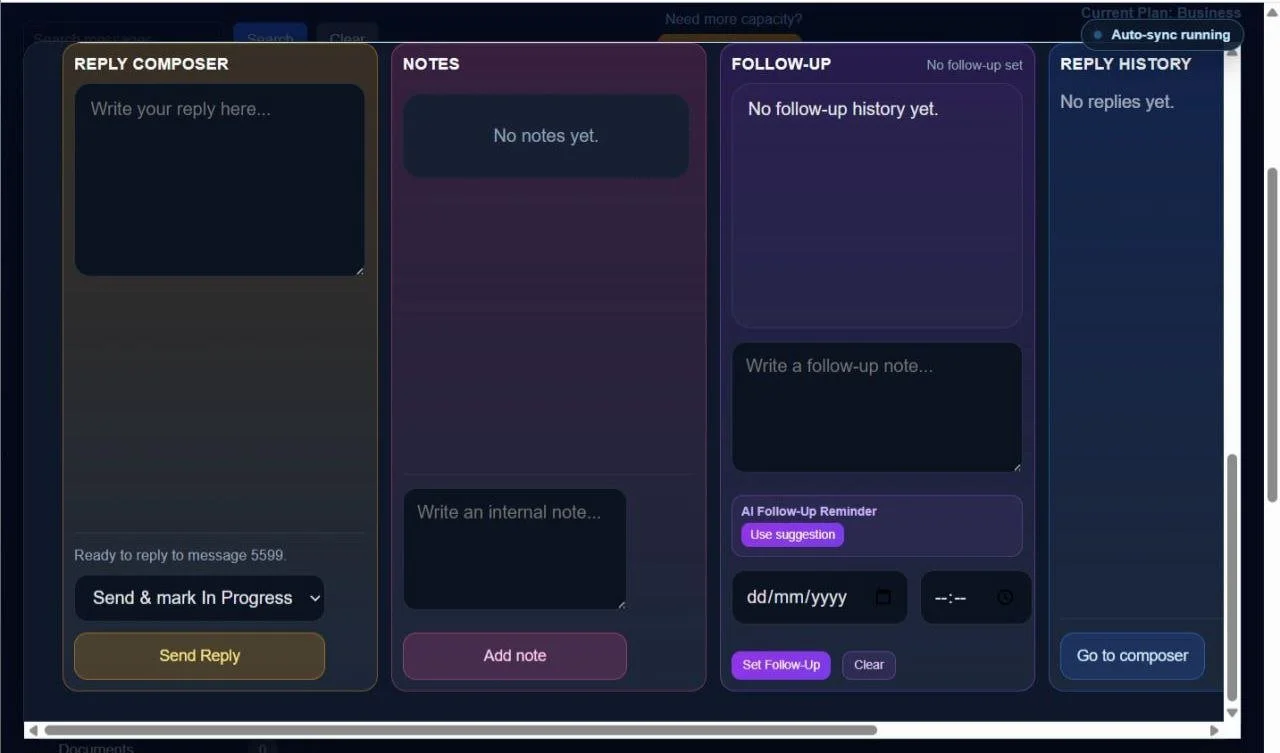
Step 8 – Collaborate around every email
Every email in PriorityEngine includes its own dedicated workspace, allowing your entire team to collaborate without leaving the platform.
The integrated Reply Composer lets you respond directly to emails and can generate AI-powered reply suggestions to help you draft professional responses faster.
Each email workspace also includes:
Internal Notes for private team discussions that are never sent to the recipient.
Follow-Up Management, including AI-assisted follow-up suggestions and reminders, ensuring important conversations are never forgotten.
Reply History, where every reply sent through PriorityEngine is stored, including which team member sent it and when.
Activity Timeline, providing a complete audit trail of every action performed on the email, including assignments, notes, replies, follow-ups, status changes, and other team activities.
Instead of relying on separate chat applications, spreadsheets, or forwarded email chains, every discussion, decision, and action remains attached to the original email. This gives your team complete visibility into the conversation and ensures everyone stays aligned.
